
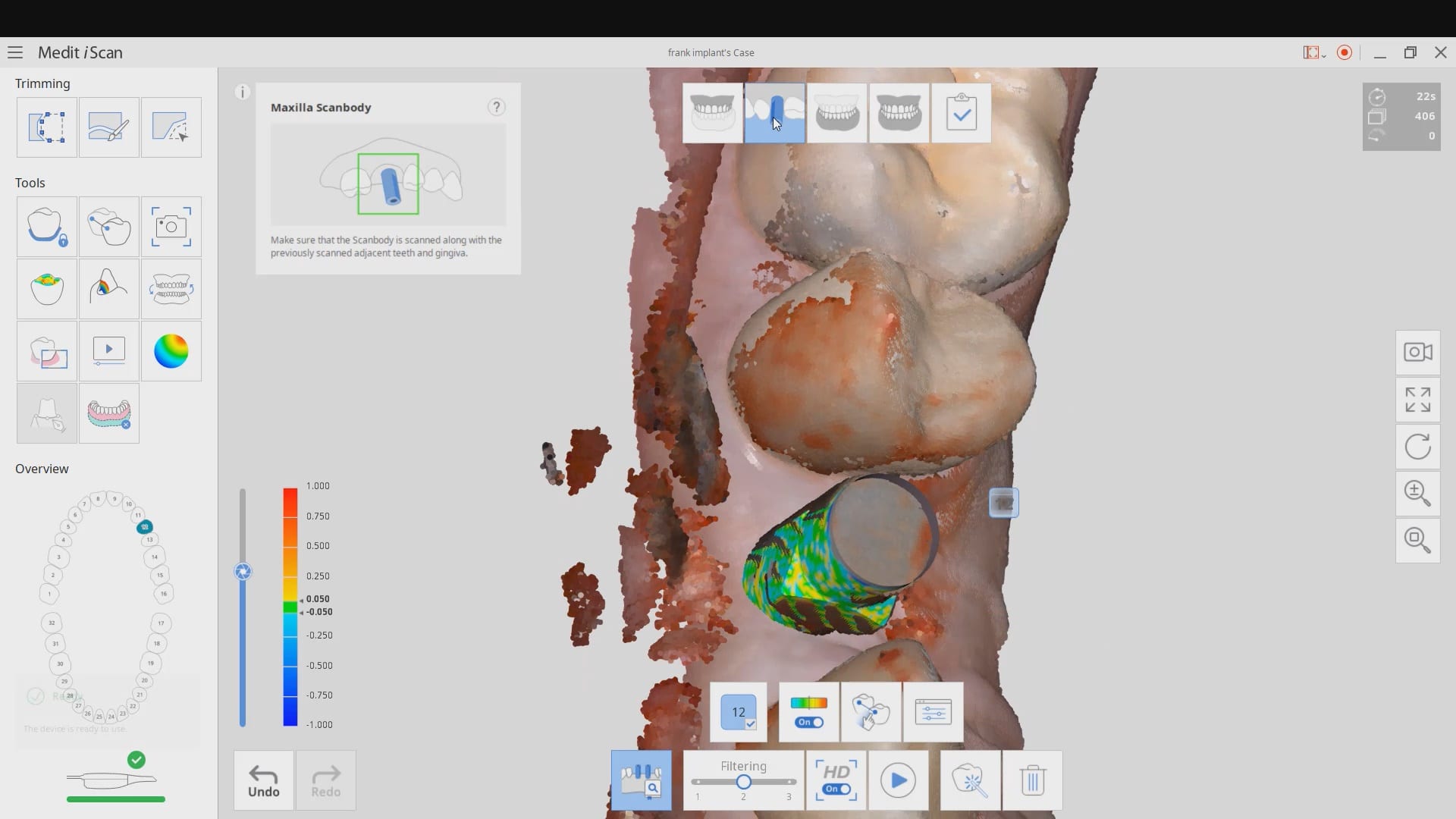
common problems when trying to image a scanbody with a bloody flap

 Jay Siddiqui
 Eric Bailey
 Iggy “Iggy” Deleon
 All Clear
 Cole Smith
 Christopher Godla
 Frank Gibbons
 Matt Stratman
 Chris Kleist
 Dan Malloy
 Rusty Fitton
 Thomas Lim
 Mark Gaches
 Jonathan Acker
 Matt v
 Dr. Terry Zervos, DDS,PA.
 Farshad Rouhani
 Nolan Andrews
 lizette aguero
 Luciana Bretz-Pavie
 Northwest Orthodontics
 Aaron S
 Yordanka Ivanova
 Diego Humberto Marquez Rodriguez
 David Jump
 Jonathan Mason
 Reid Stone
 Michael Pagano
 Ray Voller
 Michelle Duong
 Jose MoralesThomas Lim
 Daniel Eley
 Mitchell Rubinstein
 kenneth kim
 Jennifer Goodale
 Sean Landgraf
 Haruna Memuneut
 I'm fortunate enough to have her as my trading account manager I never believe investment was so profitable and genuine until I met her, she has proven herself very trustworthy that all that want to invest can reach out to her. I'm one of his benefic... read moreI'm fortunate enough to have her as my trading account manager I never believe investment was so profitable and genuine until I met her, she has proven herself very trustworthy that all that want to invest can reach out to her. I'm one of his beneficiaries, I'm here to testify how amazing she has been to me. With a little amount ($800) I started with, she trade and generated over $6,000 in 7days which surprised me because I have tried many others and failed
 Aaron - Cooleysmiles
 LoAn Huynh
 Arlington Heights Orthodontics & Pediatric Dentistry
 Daniel Hwang
 Dennis Wong
 Dr Grace Simco
I have been very happy with the Medit I purchased from Cad Ray. Everyone has been very helpful and quick to respond to my questions. They have an awesome video library for the medit, I am new to scanning and have really enjoyed the tutorial videos. - 6/16/2020
Dr Grace Simco
I have been very happy with the Medit I purchased from Cad Ray. Everyone has been very helpful and quick to respond to my questions. They have an awesome video library for the medit, I am new to scanning and have really enjoyed the tutorial videos. - 6/16/2020
 George W
 Bob D
Bob D John Eum
this video discusses some common problems you may encounter if you try and use the AI feature to identify a scanbdoy right after placement where you have a flap and a lot of bleeding in the field. It also demonstrates how to verify that the automatic stitching worked correctly and how to fix it. We also emphasize that you must not trim your TWO models to the point where there are no more common landmarks between them for the stitching to happen during processing
John Eum
this video discusses some common problems you may encounter if you try and use the AI feature to identify a scanbdoy right after placement where you have a flap and a lot of bleeding in the field. It also demonstrates how to verify that the automatic stitching worked correctly and how to fix it. We also emphasize that you must not trim your TWO models to the point where there are no more common landmarks between them for the stitching to happen during processing
